Knowledge Base
Agents rely on a knowledge base to provide accurate and relevant responses to your business. To maximize the effectiveness of your Aimdoc agent, it's essential to train your agent.
The Knowledge area includes Websites, Documents, Task Definitions (Activate plan), and Dynamic Q&A.
Knowledge Base Limits
Knowledge base capacity depends on your plan. Current limits are also shown on the pricing page.
- Convert: 40M character knowledge base
- Activate / Enterprise: Custom limits
If you need more capacity, contact us and we can help scope the right plan for your volume.
1. Websites
Aimdoc can extract information directly from your website to incorporate into its knowledge base.
Website Crawling
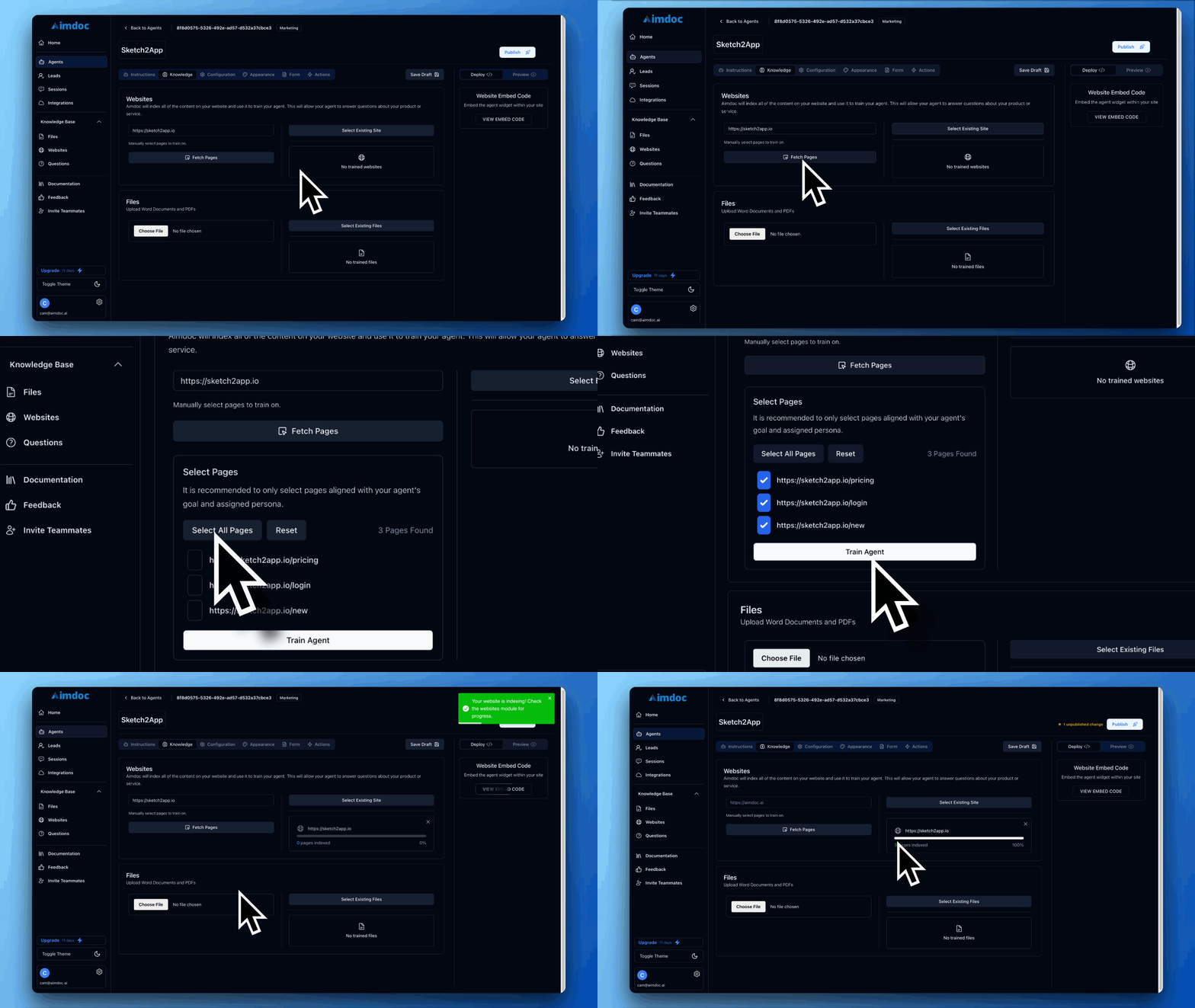
You can index an entire site inside the Agent builder experience, under the Knowledge > Websites tab.
Aimdoc will first crawl the sitemap of the URL and provide you with a list of pages it found. You can then select the pages you want to index and apply to your agent.
Add Existing Website: If you've already crawled a website for another agent, click Add Existing Website to associate it with this agent. Search and multi-select from your organization's library—no need to re-crawl.
Features:
- Train Pages: Retrain specific existing pages to update content.
- Crawl Site: Perform an ad hoc comprehensive crawl of your website.
- Autotrain: Automatically check for and train on new content. You can configure this to run daily on Convert and higher plans. You can also exclude specific routes.
- Autotrain requires your website to have a sitemap configured.
- Deleting pages will archive them, preventing them from being picked up during scheduled retraining.
2. Documents
In addition to website content, you can enhance your agent's knowledge by uploading various documents.
Supported File Types:
- PDFs
- Word Documents
- Text Files
How to Upload:
- Navigate to the Knowledge > Documents tab.
- Click Upload Files and select your documents.
- Click Train to process the documents and add them to the knowledge base.
Add Existing File: If you've already uploaded a document for another agent, click Add Existing File to associate it with this agent. Search and multi-select from your organization's library—no need to re-upload.
Ensure uploaded documents are well-organized and clearly written to facilitate accurate information extraction.
3. Task Definitions (Activate)
Task Definitions are step-by-step instructions your AI agent follows to guide users through workflows in your application. They are created by recording tasks in the App Mode tab.
The Knowledge > Task Definitions section is your organization-level library. Here you can:
- View all task definitions across your organization.
- Search and filter.
- Delete task definitions you no longer need.
Task definitions are associated with agents in the Agent Builder under the App Mode tab. You can associate the same task definition with multiple agents.
4. Dynamic Q&A
Aimdoc's dynamic Q&A feature allows you to provide specific question-and-answer pairs for precise responses.
Setting Up Dynamic Q&A:
- Create Q&A Pairs: Compile a list of common questions and answers.
- Input into Aimdoc: In the dashboard's 'Dynamic Q&A' section, manually enter pairs, or import a CSV.
- MCP: Connected assistants can add pairs in bulk with the
add_qa_pairstool. See MCP Server. - Save and Train: Aimdoc will incorporate these into its knowledge base.
Generated Q&A: When your agent encounters a question it hasn't been trained on, it will dynamically insert a new unanswered question into the Q&A list for you to review.
Extracted Knowledge (Convert Plan): Aimdoc automatically creates prefilled Q&A pairs from live chat sessions where reps have intervened, capturing high-signal human answers.
5. Understanding Knowledge Management
When managing your agent's knowledge, it's helpful to understand how Aimdoc stores and shares information across your organization.
Organization-Level Knowledge
Websites, documents, and task definitions are stored at the Organization level. This means once you crawl a website, upload a document, or create a task definition for one agent, it becomes available in your organization's library. Use Add Existing File or Add Existing Website in the Agent Builder to associate these resources with additional agents—no need to re-upload or re-crawl.
This "write once, use everywhere" approach ensures consistency across your agents and saves time when managing multiple agents.
Global Q&A
Dynamic Q&A pairs are Global for your entire organization. Any question and answer pair you create is automatically available to all of your agents. You do not need to associate Q&A pairs with specific agents manually.
Best Practices
- Consistent Updates: Regularly add new content to keep your agent up to date.
- Monitor Interactions: Review conversations to identify knowledge gaps.
- User Feedback: Use feedback to improve answers.
- Prompt Engineering: Use the Prompting tab to steer the agent towards using its knowledge base effectively.